Sample USDZ Files — Download USDZ Models for AR and Testing
USDZ — Universal Scene Description, zipped · .usdz · MIME type model/vnd.usdz+zip
Download a sample USDZ file to test AR Quick Look links, a USD pipeline or a USDZ upload validator. There are three: the torus knot as binary USD (usdc) with a UsdPreviewSurface colour, the same with the UV-grid PNG texture packed inside, and a textured version whose layer is text USD (usda).
USDZ is an uncompressed ZIP whose files are each aligned to 64 bytes, so a device can map them straight from storage. All three pass usdchecker --arkit, the compliance check Apple ships with macOS. All three load in three.js r186's USDLoader. The usda variant exists for older or simpler readers that only parse text USD — three.js's USDZLoader up to r169, for example, rejects binary layers.
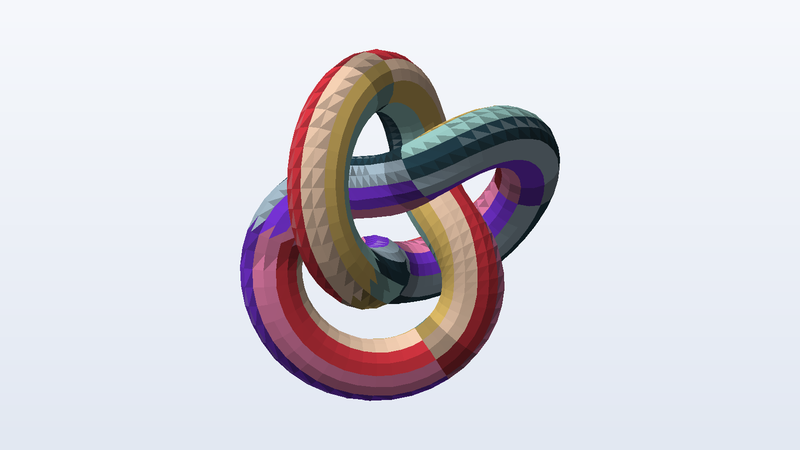
Download sample USDZ files
| File | Details | Size | Download |
|---|---|---|---|
sample-model.usdz | 4,096 triangles · 2,193 vertices · normals · UVs · 1 material · metres, Y up | 72 KB | |
sample-model-textured.usdz | 4,096 triangles · 2,193 vertices · normals · UVs · 1 material · metres, Y up | 110 KB | |
sample-model-ascii-usda.usdz | 4,096 triangles · 2,193 vertices · normals · UVs · 1 material · metres, Y up | 304 KB |
Use these files from the command line or CI
Every URL is stable and CORS-open. Pin the SHA-256 in your test and you will know the moment a fixture changes.
# Download one file
curl -O https://pnb-freetoolsforweb.s3.us-east-2.amazonaws.com/samples/3d/usdz/sample-model.usdz

# Verify it (SHA-256 is listed for every file above)
shasum -a 256 sample-model.usdz

# Machine-readable index of every sample file
curl https://pnb-freetoolsforweb.s3.us-east-2.amazonaws.com/samples/index.json | jq '.files[] | select(.format=="usdz")'
USDZ format at a glance
| Full name | USDZ — Universal Scene Description, zipped |
|---|---|
| Extensions | .usdz |
| MIME type | model/vnd.usdz+zip |
| Specification | Pixar OpenUSD, USDZ package |
| Container | ZIP, stored (no compression), 64-byte aligned |
| Layers | usdc (binary crate) and usda (text) |
| Materials | UsdPreviewSurface, UsdUVTexture |
| Validation | usdchecker --arkit passes |
What people test with sample USDZ files
- AR Quick Look links on iPhone and iPad
- USDZ upload and MIME validation
- Binary vs text USD layer handling
- Texture packaging inside USDZ
- Converting USDZ to glTF and back
- Zip alignment checks
Frequently asked questions
How do I view a USDZ file?
On an iPhone, iPad or Mac, tap or open it and it shows in Quick Look (with AR on iOS). On the web, link to it with rel="ar" for AR Quick Look. Elsewhere, Blender imports USD natively, and Pixar's usdview or the free USD tools can inspect it.
What is the difference between usda and usdc?
Both are USD layers. usda is human-readable text; usdc is the binary crate format, which is smaller and faster to load. Apple's tools write usdc, so that is what most USDZ files contain; we include a usda version for parsers that read only text.
What units and up axis do these files use?
glTF, GLB, OBJ, PLY, OFF, DAE and USDZ are Y-up in metres (the torus knot is about 1.4 m across). STL and 3MF are Z-up in millimetres and rest on z = 0, as slicers expect. FBX is Y-up in centimetres. The units and up axis of each file are listed in its details, so you can check that your importer scales and rotates correctly.
Where do these models come from?
We generate them. A script builds the geometry from formulas (a torus knot, UV spheres, cubes, and a bracket made with a boolean modelling library), then writes each file format byte by byte from its specification. Nothing is downloaded, scanned or converted from someone else's model, which is why they are free for any use, including commercial, with no attribution.
Are these USDZ files safe to download?
Yes. Every file is generated by our own open script from scratch — nothing is scraped or user-uploaded — and contains no scripts, macros or executables. The SHA-256 of each file is published on this page so you can verify what you received.
Can I use the sample USDZ files commercially?
Yes. They are free for any purpose, including commercial products, test suites, demos and redistribution, with no attribution required. There is nothing to license and no one to ask.
Can I hotlink these files or use them in CI?
Yes. Every link is a stable direct URL over HTTPS with Access-Control-Allow-Origin: * and long cache headers, so curl, wget, fetch() and test runners can pull them directly. A JSON index of every file is linked from each page (see the command-line section).
Related sample files
Free tools that work with USDZ
- Hash Generator — Hash text or files with MD5, SHA-1, SHA-256, SHA-384, SHA-512 and CRC32, verify a checksum, or compute an HMAC. Files never leave your device.
- Test File Generator — Generate a dummy file of any exact size in your browser — 1 KB to 2 GB, random bytes, text, CSV or JSON.
Found a problem, or something that could be better? We read every message and we fix things quickly.
Testing a file pipeline? We build them.
Uploads, conversions, previews, document processing and media workflows are the kind of production systems FreeToolsForWeb designs and runs for clients — which is why we needed these files in the first place.
Explore free tools