Sample glTF Files — Download glTF 2.0 (Embedded and .gltf + .bin)
glTF 2.0 — GL Transmission Format (JSON) · .gltf, .bin · MIME type model/gltf+json
Download a sample glTF file to test the JSON flavour of glTF 2.0. The same textured torus knot (4,096 triangles) is offered in the two layouts a loader has to support: a single .gltf with its geometry and PNG embedded as base64 data URIs, and a .gltf that references an external .bin buffer and .png texture by relative path — available loose and zipped.
There is also an animated, embedded .gltf with a rotation and translation loop. Every file passes the Khronos glTF Validator with zero errors and zero warnings. If you only need one file to load in a web viewer, use the binary GLB samples instead; the .gltf layouts are for testing JSON parsing, URI resolution and multi-file uploads.
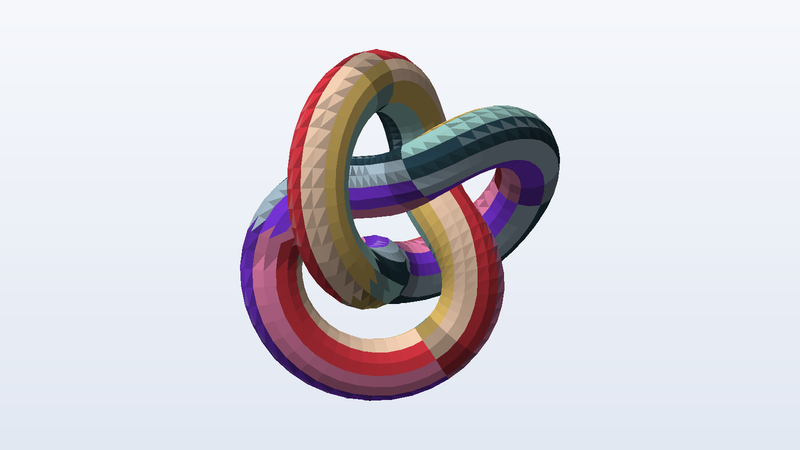
Download sample glTF files
| File | Details | Size | Download |
|---|---|---|---|
sample-model-separate.gltf | 4,096 triangles · 2,193 vertices · normals · UVs · 1 material · metres, Y up | 3 KB | |
sample-animated-embedded.gltf | 1,024 triangles · 512 vertices · normals · 1 material · 1 animation · metres, Y up | 28 KB | |
sample-uv-grid-texture.png | 512 × 512 | 37 KB | |
sample-model-gltf-bin-png.zip | 3 entries · 4,096 triangles · 2,193 vertices · normals · UVs · 1 material · metres, Y up | 95 KB | |
sample-model-separate.bin | — | 95 KB | |
sample-model-embedded.gltf | 4,096 triangles · 2,193 vertices · normals · UVs · 1 material · metres, Y up | 178 KB |
Use these files from the command line or CI
Every URL is stable and CORS-open. Pin the SHA-256 in your test and you will know the moment a fixture changes.
# Download one file
curl -O https://pnb-freetoolsforweb.s3.us-east-2.amazonaws.com/samples/3d/gltf/sample-model-separate.gltf

# Verify it (SHA-256 is listed for every file above)
shasum -a 256 sample-model-separate.gltf

# Machine-readable index of every sample file
curl https://pnb-freetoolsforweb.s3.us-east-2.amazonaws.com/samples/index.json | jq '.files[] | select(.format=="gltf")'
glTF format at a glance
| Full name | glTF 2.0 — GL Transmission Format (JSON) |
|---|---|
| Extensions | .gltf, .bin |
| MIME type | model/gltf+json |
| Specification | Khronos glTF 2.0 (ISO/IEC 12113:2022) |
| Encoding | JSON + binary buffers (external .bin or base64 data URI) |
| Materials | PBR metallic-roughness |
| Units and axes | Metres, Y up, right-handed (fixed by the spec) |
| Validation | Khronos glTF-Validator: 0 errors, 0 warnings |
What people test with sample glTF files
- Resolving relative .bin and texture URIs
- Decoding base64 data URIs in embedded glTF
- Multi-file model uploads and ZIP extraction
- glTF JSON schema validation
- Animation playback (node rotation and translation)
- Inspecting a model by reading its JSON
Frequently asked questions
What is the difference between .gltf and .glb?
Same data model, different container. A .gltf is JSON that points to binary buffers and images, either as separate files or as base64 inside the JSON. A .glb packs the JSON and one binary buffer into a single little-endian binary file with no base64 overhead. Use GLB for delivery and .gltf when you want to read or edit the JSON.
Why does my viewer show the separate .gltf without a texture?
Because it could not fetch sample-uv-grid-texture.png or sample-model-separate.bin. Those are resolved relative to the .gltf's own URL. Loaded from this site they sit in the same folder and work; uploaded on their own, the .gltf is incomplete — use the ZIP bundle or the embedded file.
What units and up axis do these files use?
glTF, GLB, OBJ, PLY, OFF, DAE and USDZ are Y-up in metres (the torus knot is about 1.4 m across). STL and 3MF are Z-up in millimetres and rest on z = 0, as slicers expect. FBX is Y-up in centimetres. The units and up axis of each file are listed in its details, so you can check that your importer scales and rotates correctly.
Where do these models come from?
We generate them. A script builds the geometry from formulas (a torus knot, UV spheres, cubes, and a bracket made with a boolean modelling library), then writes each file format byte by byte from its specification. Nothing is downloaded, scanned or converted from someone else's model, which is why they are free for any use, including commercial, with no attribution.
Are these glTF files safe to download?
Yes. Every file is generated by our own open script from scratch — nothing is scraped or user-uploaded — and contains no scripts, macros or executables. The SHA-256 of each file is published on this page so you can verify what you received.
Can I use the sample glTF files commercially?
Yes. They are free for any purpose, including commercial products, test suites, demos and redistribution, with no attribution required. There is nothing to license and no one to ask.
Can I hotlink these files or use them in CI?
Yes. Every link is a stable direct URL over HTTPS with Access-Control-Allow-Origin: * and long cache headers, so curl, wget, fetch() and test runners can pull them directly. A JSON index of every file is linked from each page (see the command-line section).
Related sample files
Free tools that work with glTF
- JSON Formatter — Pretty-print, minify and validate JSON, with parse errors located by line and column. In your browser, no upload.
- Base64 Encoder / Decoder — Encode text or files to Base64, turn images into data URIs with CSS and <img> snippets, and decode Base64 back to a previewable file. Nothing leaves your browser.
- Hash Generator — Hash text or files with MD5, SHA-1, SHA-256, SHA-384, SHA-512 and CRC32, verify a checksum, or compute an HMAC. Files never leave your device.
Found a problem, or something that could be better? We read every message and we fix things quickly.
Testing a file pipeline? We build them.
Uploads, conversions, previews, document processing and media workflows are the kind of production systems FreeToolsForWeb designs and runs for clients — which is why we needed these files in the first place.
Explore free tools