Sample STL Files — Download Binary and ASCII STL for Testing
STL — Stereolithography triangle mesh · .stl · MIME type model/stl
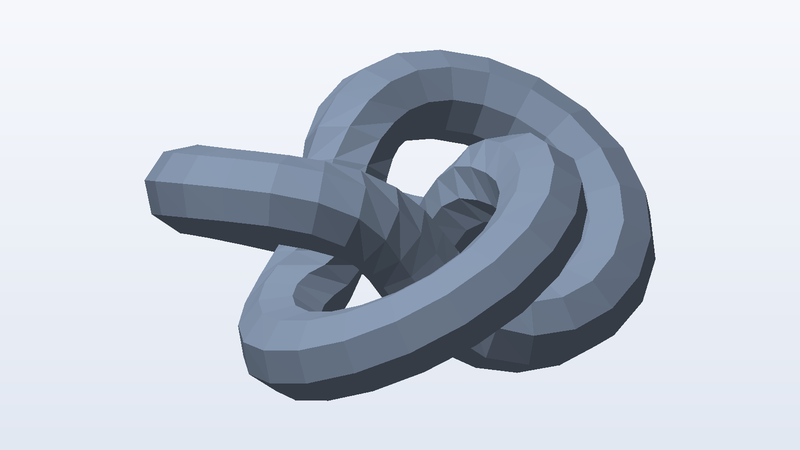
Download a sample STL file to test a slicer integration, a 3D upload form, a mesh thumbnailer or an STL parser. The hero model is a (2,3) torus knot — a single closed tube that loops through itself, so it has curvature everywhere, no flat faces to hide shading bugs behind, and a UV seam that runs the length of the tube. It comes in three densities — 1,024, 51,200 and 524,288 triangles — in both binary and ASCII, so you can test the two encodings against each other and see how your code scales from 51 KB to 26 MB.
There is also a print-ready L-bracket (40 × 20 × 24 mm, watertight, with three 4.2 mm holes) and a file containing three separate bodies. Every STL is Z-up in millimetres and rests on the build plate at z = 0. STL stores nothing but triangles — no units, colours, materials or UVs — which is exactly why it is still the lowest common denominator for 3D printing.
Download sample STL files
| File | Details | Size | Download |
|---|---|---|---|
sample-print-ready-bracket-mm.stl | 614 triangles · 1,842 vertices · normals · millimetres, Z up | 31 KB | |
sample-model-low-poly-binary.stl | 1,024 triangles · 3,072 vertices · normals · millimetres, Z up | 51 KB | |
sample-multi-body.stl | 2,248 triangles · 6,744 vertices · 3 bodies · normals · millimetres, Z up | 112 KB | |
sample-model-low-poly-ascii.stl | 1,024 triangles · 3,072 vertices · normals · millimetres, Z up | 259 KB | |
sample-model-medium-poly-binary.stl | 51,200 triangles · 153,600 vertices · normals · millimetres, Z up | 2.6 MB | |
sample-model-medium-poly-ascii.stl | 51,200 triangles · 153,600 vertices · normals · millimetres, Z up | 13 MB | |
sample-model-high-poly-binary.stl | 524,288 triangles · 1,572,864 vertices · normals · millimetres, Z up | 26 MB |
Use these files from the command line or CI
Every URL is stable and CORS-open. Pin the SHA-256 in your test and you will know the moment a fixture changes.
# Download one file
curl -O https://pnb-freetoolsforweb.s3.us-east-2.amazonaws.com/samples/3d/stl/sample-print-ready-bracket-mm.stl

# Verify it (SHA-256 is listed for every file above)
shasum -a 256 sample-print-ready-bracket-mm.stl

# Machine-readable index of every sample file
curl https://pnb-freetoolsforweb.s3.us-east-2.amazonaws.com/samples/index.json | jq '.files[] | select(.format=="stl")'
STL format at a glance
| Full name | STL — Stereolithography triangle mesh |
|---|---|
| Extensions | .stl |
| MIME type | model/stl |
| Encodings | Binary (80-byte header, uint32 count, 50 bytes per triangle) and ASCII |
| Geometry | Triangles only, one facet normal each, no shared vertices |
| Units | None in the file — these samples are millimetres, Z up |
| Binary size | 84 + 50 × triangles bytes, exactly |
| Triangle counts | 614 to 524,288 |
What people test with sample STL files
- Slicer and print-service upload validation
- Binary vs ASCII STL detection
- Mesh thumbnail and preview generation
- Watertightness and volume checks for print quotes
- Upload size limits and parser performance (26 MB high-poly file)
- Splitting a multi-body STL into separate parts
Frequently asked questions
Should I use binary or ASCII STL?
Binary, almost always. It is about a fifth of the size, faster to parse, and its size is predictable from the triangle count. ASCII STL exists for readability and debugging; support both on input, because users will upload both.
Are these STL files printable?
Yes. Every mesh is closed and 2-manifold with consistent outward winding and positive volume (checked with trimesh before publishing). The bracket was built specifically as a printable part: 4 mm walls, flat base on z = 0, and the only overhang is the horizontal hole in the upright.
Why do STL files have no colour or units?
The format dates from 1987 and stores only triangles and normals. Some tools hide colour in the 2-byte attribute field, but it is non-standard and we leave it zero. Units are implied: almost every slicer assumes millimetres. If you need colour, multiple materials or explicit units, use 3MF instead.
What units and up axis do these files use?
glTF, GLB, OBJ, PLY, OFF, DAE and USDZ are Y-up in metres (the torus knot is about 1.4 m across). STL and 3MF are Z-up in millimetres and rest on z = 0, as slicers expect. FBX is Y-up in centimetres. The units and up axis of each file are listed in its details, so you can check that your importer scales and rotates correctly.
Where do these models come from?
We generate them. A script builds the geometry from formulas (a torus knot, UV spheres, cubes, and a bracket made with a boolean modelling library), then writes each file format byte by byte from its specification. Nothing is downloaded, scanned or converted from someone else's model, which is why they are free for any use, including commercial, with no attribution.
Are these STL files safe to download?
Yes. Every file is generated by our own open script from scratch — nothing is scraped or user-uploaded — and contains no scripts, macros or executables. The SHA-256 of each file is published on this page so you can verify what you received.
Can I use the sample STL files commercially?
Yes. They are free for any purpose, including commercial products, test suites, demos and redistribution, with no attribution required. There is nothing to license and no one to ask.
Can I hotlink these files or use them in CI?
Yes. Every link is a stable direct URL over HTTPS with Access-Control-Allow-Origin: * and long cache headers, so curl, wget, fetch() and test runners can pull them directly. A JSON index of every file is linked from each page (see the command-line section).
Related sample files
Free tools that work with STL
- Hash Generator — Hash text or files with MD5, SHA-1, SHA-256, SHA-384, SHA-512 and CRC32, verify a checksum, or compute an HMAC. Files never leave your device.
- Unit Converter — Convert between every common unit — metric and imperial, cooking, data, pressure, energy, speed, fuel economy — instantly, in your browser.
- Test File Generator — Generate a dummy file of any exact size in your browser — 1 KB to 2 GB, random bytes, text, CSV or JSON.
Found a problem, or something that could be better? We read every message and we fix things quickly.
Testing a file pipeline? We build them.
Uploads, conversions, previews, document processing and media workflows are the kind of production systems FreeToolsForWeb designs and runs for clients — which is why we needed these files in the first place.
Explore free tools