Sample OBJ Files — Download OBJ with MTL and Texture for Testing
Wavefront OBJ (with MTL material library) · .obj, .mtl · MIME type model/obj
Download a sample OBJ file to test an OBJ importer, a viewer, or an upload flow that has to handle a model plus its companion files. The textured sample is the classic three-file set — sample-model-textured.obj, its .mtl material library and a PNG UV-grid texture — offered both as loose files (in the same folder, so relative paths resolve when loaded from a URL) and zipped together.
The other files isolate the variations parsers get wrong: an OBJ with normals and UVs but no material library, a 51,200-triangle file with positions only, and an untriangulated file of quads, pentagons and hexagons. Positions, texture coordinates and normals use separate index streams (f v/vt/vn), as real exporters write them, rather than one index per vertex.
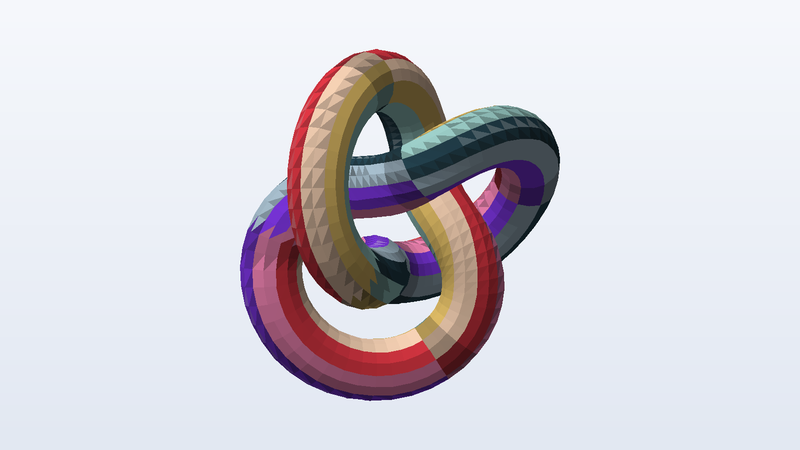
Download sample OBJ files
| File | Details | Size | Download |
|---|---|---|---|
sample-model-textured.mtl | 1 material | 198 B | |
sample-quads-and-ngons.obj | 128 polygons · 158 vertices · metres, Y up | 5 KB | |
sample-uv-grid-texture.png | 512 × 512 | 37 KB | |
sample-model-textured-obj-mtl-png.zip | 3 entries · 4,096 triangles · 2,048 vertices · normals · UVs · 1 material · metres, Y up | 120 KB | |
sample-model-no-mtl.obj | 4,096 triangles · 2,048 vertices · normals · UVs · metres, Y up | 336 KB | |
sample-model-textured.obj | 4,096 triangles · 2,048 vertices · normals · UVs · 1 material · metres, Y up | 336 KB | |
sample-model-positions-only.obj | 51,200 triangles · 25,600 vertices · metres, Y up | 1.7 MB |
Use these files from the command line or CI
Every URL is stable and CORS-open. Pin the SHA-256 in your test and you will know the moment a fixture changes.
# Download one file
curl -O https://pnb-freetoolsforweb.s3.us-east-2.amazonaws.com/samples/3d/obj/sample-model-textured.mtl

# Verify it (SHA-256 is listed for every file above)
shasum -a 256 sample-model-textured.mtl

# Machine-readable index of every sample file
curl https://pnb-freetoolsforweb.s3.us-east-2.amazonaws.com/samples/index.json | jq '.files[] | select(.format=="obj")'
OBJ format at a glance
| Full name | Wavefront OBJ (with MTL material library) |
|---|---|
| Extensions | .obj, .mtl |
| MIME type | model/obj |
| Encoding | Plain text (UTF-8), one element per line |
| Faces | Triangles, quads and n-gons; 1-based indices, negative indices allowed |
| Materials | External .mtl file (mtllib / usemtl); texture via map_Kd |
| Units | None in the file — these samples are metres, Y up |
| Triangle counts | 308 (equivalent) to 51,200 |
What people test with sample OBJ files
- OBJ + MTL + texture loading with relative paths
- Accepting a model as a ZIP of companion files
- Handling a missing or optional material library
- Triangulating quads and n-gons on import
- Separate v / vt / vn index streams
- Text-parser performance on a 1.7 MB file
Frequently asked questions
What is the MTL file and do I need it?
The MTL (material template library) holds the colours and texture references for the OBJ. The OBJ names it with an mtllib line and assigns materials with usemtl. Without it the geometry still loads, just untextured — which is what the no-MTL sample lets you test.
Why is the texture upside down in my viewer?
OBJ texture coordinates put (0, 0) at the bottom-left of the image. Some engines, and all glTF data, use the top-left. Our UV grid is labelled A1 at the bottom-left with U and V arrows, so you can see immediately whether your loader flips V.
Does OBJ support animation or vertex colours?
No animation. Vertex colours exist only as an unofficial extension (extra numbers after each v line) that many readers ignore, so we do not use it. For colours use PLY; for animation use glTF or FBX.
What units and up axis do these files use?
glTF, GLB, OBJ, PLY, OFF, DAE and USDZ are Y-up in metres (the torus knot is about 1.4 m across). STL and 3MF are Z-up in millimetres and rest on z = 0, as slicers expect. FBX is Y-up in centimetres. The units and up axis of each file are listed in its details, so you can check that your importer scales and rotates correctly.
Where do these models come from?
We generate them. A script builds the geometry from formulas (a torus knot, UV spheres, cubes, and a bracket made with a boolean modelling library), then writes each file format byte by byte from its specification. Nothing is downloaded, scanned or converted from someone else's model, which is why they are free for any use, including commercial, with no attribution.
Are these OBJ files safe to download?
Yes. Every file is generated by our own open script from scratch — nothing is scraped or user-uploaded — and contains no scripts, macros or executables. The SHA-256 of each file is published on this page so you can verify what you received.
Can I use the sample OBJ files commercially?
Yes. They are free for any purpose, including commercial products, test suites, demos and redistribution, with no attribution required. There is nothing to license and no one to ask.
Can I hotlink these files or use them in CI?
Yes. Every link is a stable direct URL over HTTPS with Access-Control-Allow-Origin: * and long cache headers, so curl, wget, fetch() and test runners can pull them directly. A JSON index of every file is linked from each page (see the command-line section).
Related sample files
Free tools that work with OBJ
- Hash Generator — Hash text or files with MD5, SHA-1, SHA-256, SHA-384, SHA-512 and CRC32, verify a checksum, or compute an HMAC. Files never leave your device.
- Test File Generator — Generate a dummy file of any exact size in your browser — 1 KB to 2 GB, random bytes, text, CSV or JSON.
Found a problem, or something that could be better? We read every message and we fix things quickly.
Testing a file pipeline? We build them.
Uploads, conversions, previews, document processing and media workflows are the kind of production systems FreeToolsForWeb designs and runs for clients — which is why we needed these files in the first place.
Explore free tools